Interactive 3D Real Estate Platform
KAYAA STUDIO
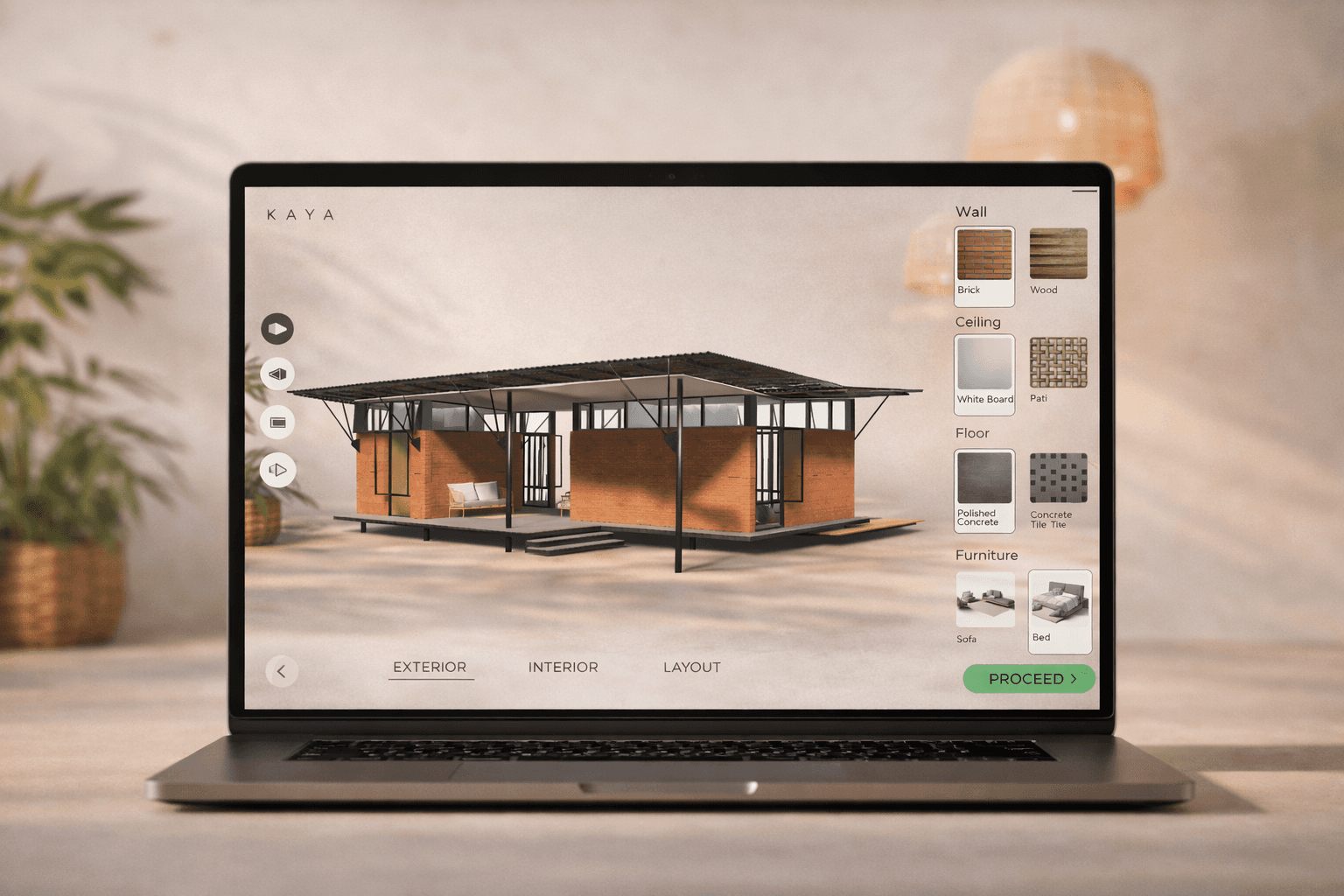
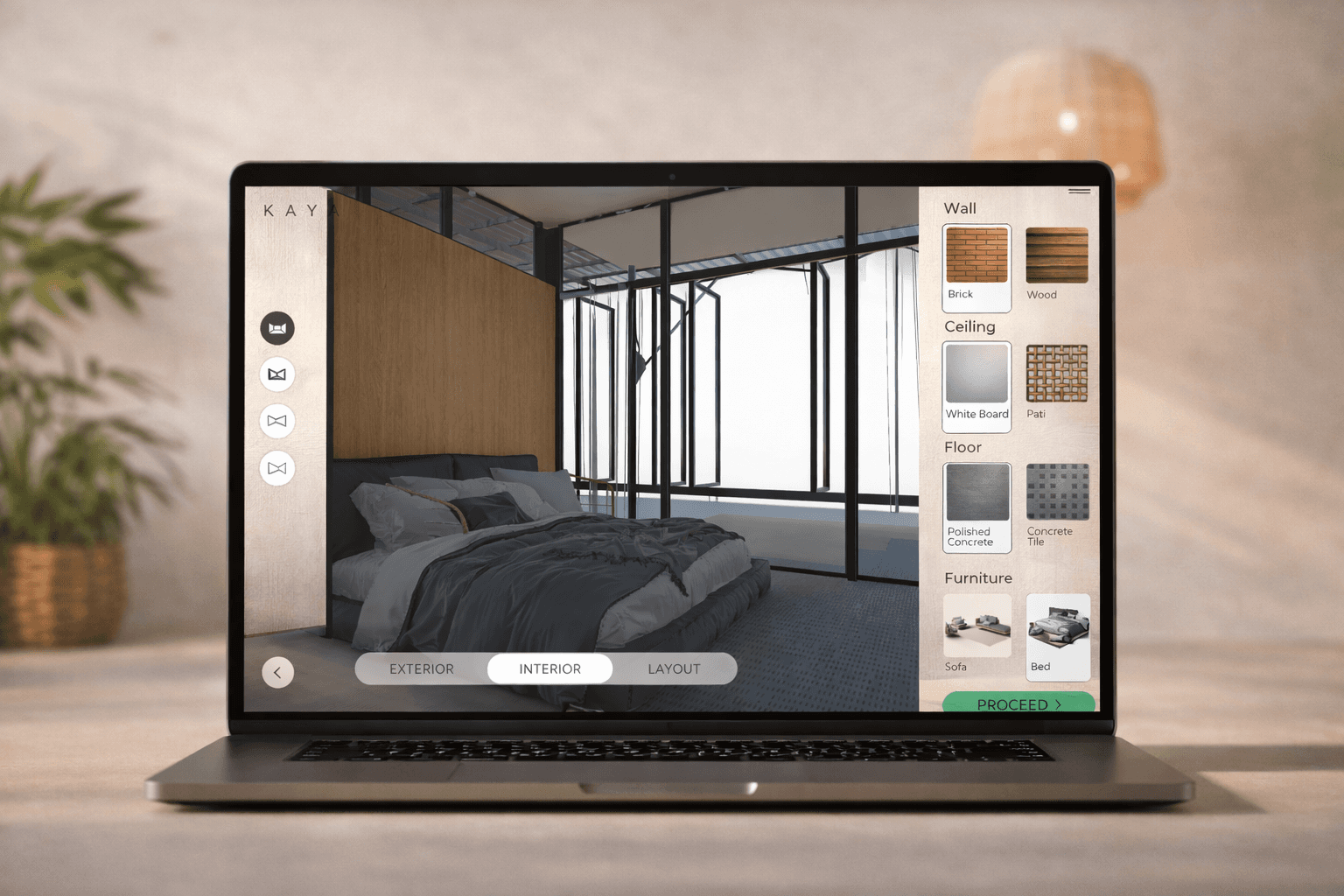
Kayaa Studio is a browser-based 3D property visualization tool that lets potential buyers explore real estate properties in full 3D space — and customize them in real time. Users can walk through rooms, swap materials on floors, walls, countertops, and fixtures, and see exactly how their choices look before committing. Once satisfied, they submit their customized configuration directly to the property owner to request a quote — turning passive property browsing into an interactive buying experience. Built with Unity and C#, deployed on the web via WebGL with zero downloads required.
client
softlab it
Link
industry
Real Estate & PropTech
Scope of work
3D Development
WebGL Deployment
Unity & C#

Problem
Buying or renting property is one of the biggest financial decisions people make — yet the experience is still built on flat photos and static floor plans. Buyers can't visualize how a space actually feels, how natural light hits the kitchen at noon, or whether hardwood looks better than tile in the living room. Property owners lose potential buyers who simply can't picture themselves in the space. The industry needed a tool that lets buyers experience properties interactively, make customization decisions in real time, and communicate those preferences directly to the owner — all without scheduling a physical site visit or downloading specialized software.
Challange
The core engineering challenge was delivering a high-fidelity 3D experience inside a web browser without sacrificing performance. WebGL has strict memory and rendering constraints compared to native Unity builds — every texture, mesh, and lighting calculation had to be optimized to run smoothly on mid-range hardware without frame drops or excessive load times. The material customization system needed to swap textures and shaders on arbitrary surfaces in real time while maintaining physically accurate lighting and reflections — a tile floor reflects light differently than hardwood, and that difference matters when buyers are making decisions. Camera controls had to feel intuitive for non-technical users: orbit views for overview, walk-through mode for immersion, and zoom for detail inspection. Finally, the quote request flow needed to capture the user's exact configuration — every material choice, every room modification — and package it cleanly for the property owner to review.
Solution
The platform was built in Unity with C#, designed from the ground up for WebGL deployment — meaning every architectural decision was filtered through browser performance constraints. Key technical decisions: → Dynamic material system built on Unity's Scriptable Objects — each surface (floor, wall, countertop, ceiling, fixtures) is mapped to a material slot that can be swapped at runtime. Materials include PBR textures (albedo, normal, roughness, metallic) for physically accurate rendering, so a marble counter actually looks like marble under the scene's lighting conditions. → Optimized 3D asset pipeline — models are decimated to WebGL-safe polygon counts, textures are compressed with platform-appropriate formats (ETC2/ASTC), and LOD (Level of Detail) groups are configured so distant objects use simpler meshes. This keeps the build under browser memory limits while maintaining visual quality where it matters — up close. → Dual camera system — Orbit Mode for top-down exploration and room overview, and Walk-Through Mode using a first-person controller for immersive room-by-room navigation. Smooth transitions between modes with configurable sensitivity for mouse, touch, and trackpad input. → Real-time UI overlay built with Unity's UI Toolkit — a clean side panel lets users browse material categories (Floors, Walls, Fixtures), preview swatches, and apply changes instantly. Every selection triggers a live update on the 3D model with no reload or delay. → Quote request system — when the user finalizes their customization, the app captures a configuration snapshot: property ID, room-by-room material selections, optional notes, and a timestamp. This payload is serialized to JSON and submitted to the property owner's dashboard via a REST API endpoint, giving them a complete picture of what the buyer wants — with no ambiguity. → WebGL build optimization — texture atlasing, draw call batching, and aggressive lightmap baking to reduce real-time computation. The final build loads in under 8 seconds on a standard broadband connection and runs at 30+ FPS on mid-range laptops. The result is a tool that turns property listings from static pages into interactive experiences — buyers explore, customize, and request quotes without leaving their browser.